

If you are evaluating pharmacy workflow software, one of the first questions to ask is not whether it can print a receipt. The better question is what exactly happens between order capture, payment, dispensing, refund, and return.
In Maduuka, a pharmacy sale is not treated as one till event. It moves through a controlled sequence of states and permissions: `ordered -> paid -> dispensed`, with `partially_dispensed`, `cancelled`, `refund`, `flag`, and `return` paths for exceptions. That is what keeps the order, the money, the medicine, the batch, and the audit trail telling the same story.

Direct Answer
What is the Maduuka pharmacy workflow?
The Maduuka pharmacy workflow is a controlled sales process that separates order entry, payment collection, stock deduction, dispensing approval, and exception handling. Stock moves only when medicines are actually dispensed, not when an order is typed or when money is collected.
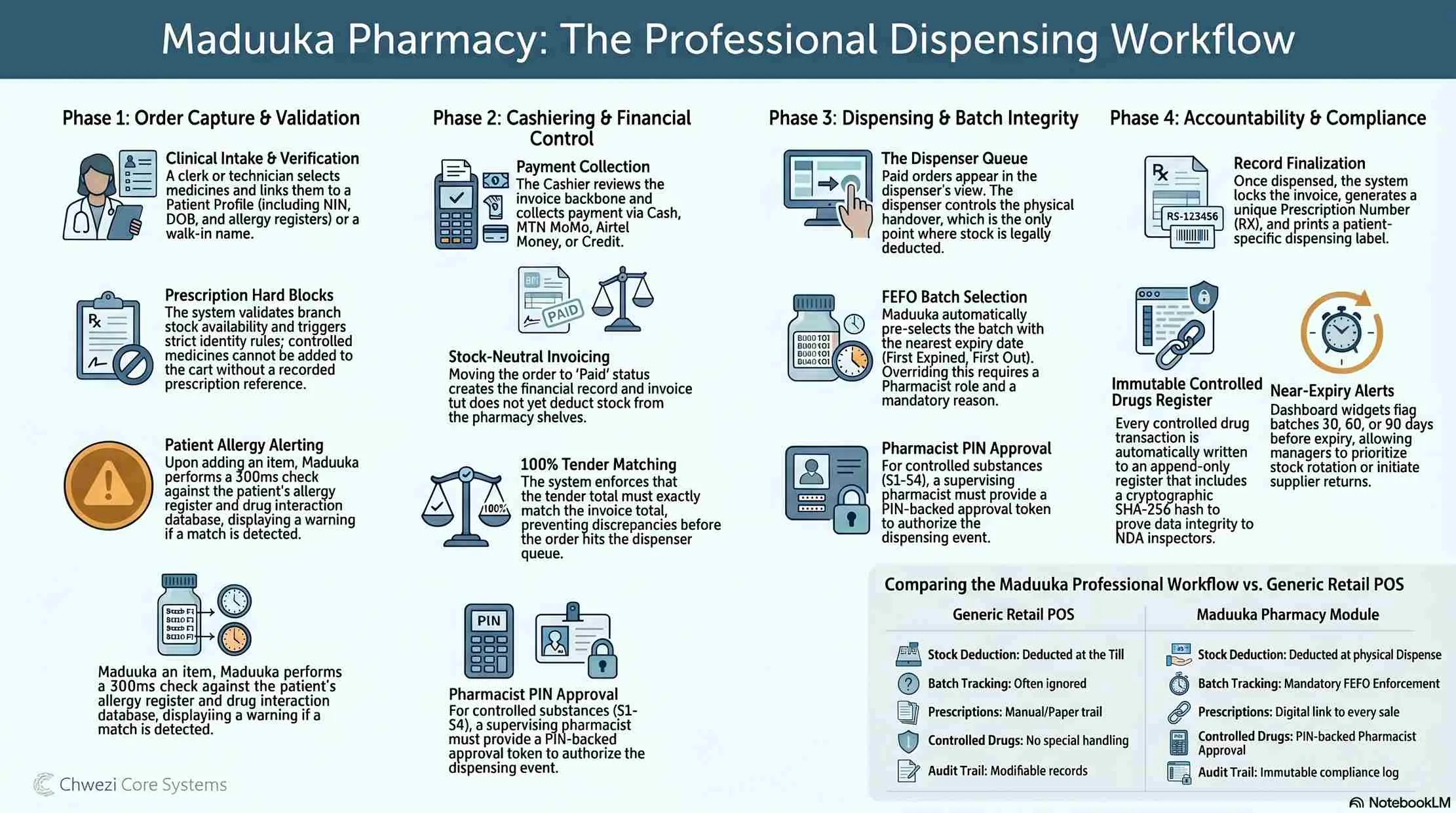
Step by Step
From order capture to batch-level return
A pharmacy does not need a faster till event. It needs a stronger operational sequence. These phases are what make Maduuka useful in a real pharmacy rather than a generic retail screen with medicine names.
1. Order Capture and Validation
The sale starts as a controlled request, not as an automatic stock issue.
A clerk selects medicines, links the order to a patient profile or walk-in name, and can attach a prescription reference.
Prescription-based sales trigger stricter identity rules: walk-ins cannot carry prescriptions, the patient must have a phone number, and controlled medicines cannot be sold without a prescription.
Before acceptance, Maduuka validates branch context, confirms the branch has a warehouse, checks stock availability at that branch, and blocks the sale if quantity is unavailable.
2. Cashiering and Payment Control
The cashier can collect money, but still cannot force stock out of the pharmacy.
Maduuka creates the invoice backbone and leaves the pharmacy order in `ordered` state. No stock is deducted yet.
The cashier reviews patient details, prescription reference, branch, item preview, and available customer credit.
Payment supports cash, mobile money, bank transfer, card, credit, and split tender, but the tender total must exactly match the invoice total.
If credit is used, Maduuka checks remaining credit headroom first and creates the debt record so the balance appears in receivables reporting.
3. Dispensing and Batch Control
The dispenser controls the physical handover, and that is where stock integrity is protected.
After successful payment, the order moves from `ordered` to `paid`, the system records who took payment and when, and a `payment_taken` event is written to the audit trail.
Paid orders appear in the dispenser queue by payment time. Maduuka calculates pending quantity, dispensed quantity, and FEFO suggestions from approved non-expired batches.
For controlled medicines, a supervising pharmacist must approve with a PIN-backed token tied to that exact dispense action.
Only when the dispenser confirms does Maduuka lock the invoice and affected batches, post stock movements atomically, store the fulfilling batch per invoice line, and move the order to `dispensed` or `partially_dispensed`.
4. Exceptions, Returns, and Reporting
Mistakes and edge cases stay explicit instead of being hidden by record edits.
An unpaid `ordered` sale can be voided. A paid but not yet dispensed sale can be refunded and cancelled.
A dispenser can flag a paid order back to cashier without corrupting the workflow history.
A partially dispensed order can be closed with a refund for the unserved portion, while a fully dispensed order can be returned to the original source batch.
Pharmacy revenue reports count only `dispensed` or `partially_dispensed` orders, which keeps revenue aligned with fulfilled medicine sales rather than money collected alone.

Why This Matters
Why pharmacies need stronger boundaries than ordinary shops
In a normal retail sale, one cashier can often select an item, collect payment, and reduce stock in one step. That is acceptable for ordinary merchandise. It is weak for a pharmacy.
Pharmacies need stronger workflow boundaries because prescription identity, controlled medicines, patient safety, batch traceability, expiry risk, and return logic all sit inside the same transaction.
Maduuka handles that by separating roles, validating branch stock before the order is accepted, and delaying stock deduction until the dispenser confirms the exact physical issue.
Accountability Layer
How this workflow protects stock, cash, and supervision
Maduuka improves accountability because important actions are separated, permissioned, timestamped, and traceable. This is not cosmetic workflow design. It is operational control.
Role separation
Order entry, cashiering, dispensing, controlled-drug approval, refunds, and returns sit behind distinct permissions so one person does not casually control the whole sale lifecycle.
Stock protection
Stock is not reduced at order entry and not even at payment. It is reduced only at dispense, and every deduction is tied to a specific batch.
Batch traceability
Each dispensed item remains tied to the exact batch that fulfilled it, which matters for expiry control, recalls, controlled substances, and returns.
Cash accountability
Every payment is attached to the invoice, mapped to the right payment method, and posted to the correct ledger or receivable record.
Operational visibility
Partial dispensing, flags back to cashier, refunds, and returns remain explicit events in the audit trail instead of hidden edits.
Cleaner management reporting
Because pharmacy revenue excludes paid-but-not-dispensed orders, managers can reconcile stock movement, revenue, and cashier activity with far less noise.
Exception Paths
Mistakes stay explicit instead of disappearing into edits
A serious pharmacy system should not encourage silent correction. It should preserve the history of what happened, who acted, and why. That is why Maduuka treats voids, refunds, flags, partial close-outs, and returns as explicit paths rather than hidden record changes.
Void
Used for unpaid `ordered` sales that should not proceed.
Refund and Cancel
Used when payment was collected but medicines were not yet dispensed.
Flag Back to Cashier
Lets dispensing surface a problem without corrupting the state history.
Return to Batch
For fully dispensed orders, stock is restored to the original source batch rather than treated as a generic product adjustment.

FAQ
Questions owners and managers usually ask
What is the most important design rule in the Maduuka pharmacy workflow?
Stock moves only when medicines are actually dispensed. Not when the order is typed. Not when money is collected. That is the core control protecting stock accuracy and pharmacy accountability.
How does Maduuka handle controlled medicines?
Controlled medicines require a second-person control. A supervising pharmacist must approve with a PIN-backed token tied to that exact dispense action, so the dispenser cannot self-approve the issue.
Can Maduuka support partial dispensing?
Yes. The served quantity is preserved, the remaining quantity stays pending, and the order remains visible in the dispenser queue so teams can complete it later without losing history.
Why does Maduuka count only dispensed orders in pharmacy revenue reports?
Because management should reconcile fulfilled medicine sales, not just collected money. This keeps revenue closer to actual service and reduces noise in stock and cash reconciliation.
See how this workflow fits into the full pharmacy module
The article explains the logic. The module page shows how Maduuka positions dispensing queues, branch stock, controlled-medicine approval, and pharmacy reporting inside the wider operating system for growing businesses. The related inventory page explains the batch, expiry, FEFO, stock count, warehouse, and recall controls that support this pharmacy workflow. The software architecture guide then shows how pharmacy controls connect to the shared API, business core, and tenant-scoped data.