

Pharmacy Software That Controls the Whole Sale Lifecycle
From ordered to paid to dispensed, Maduuka gives pharmacies a controlled workflow with stronger identity rules, FEFO batch suggestions, controlled-drug approvals, and reporting based on medicines actually served.
Workflow Map
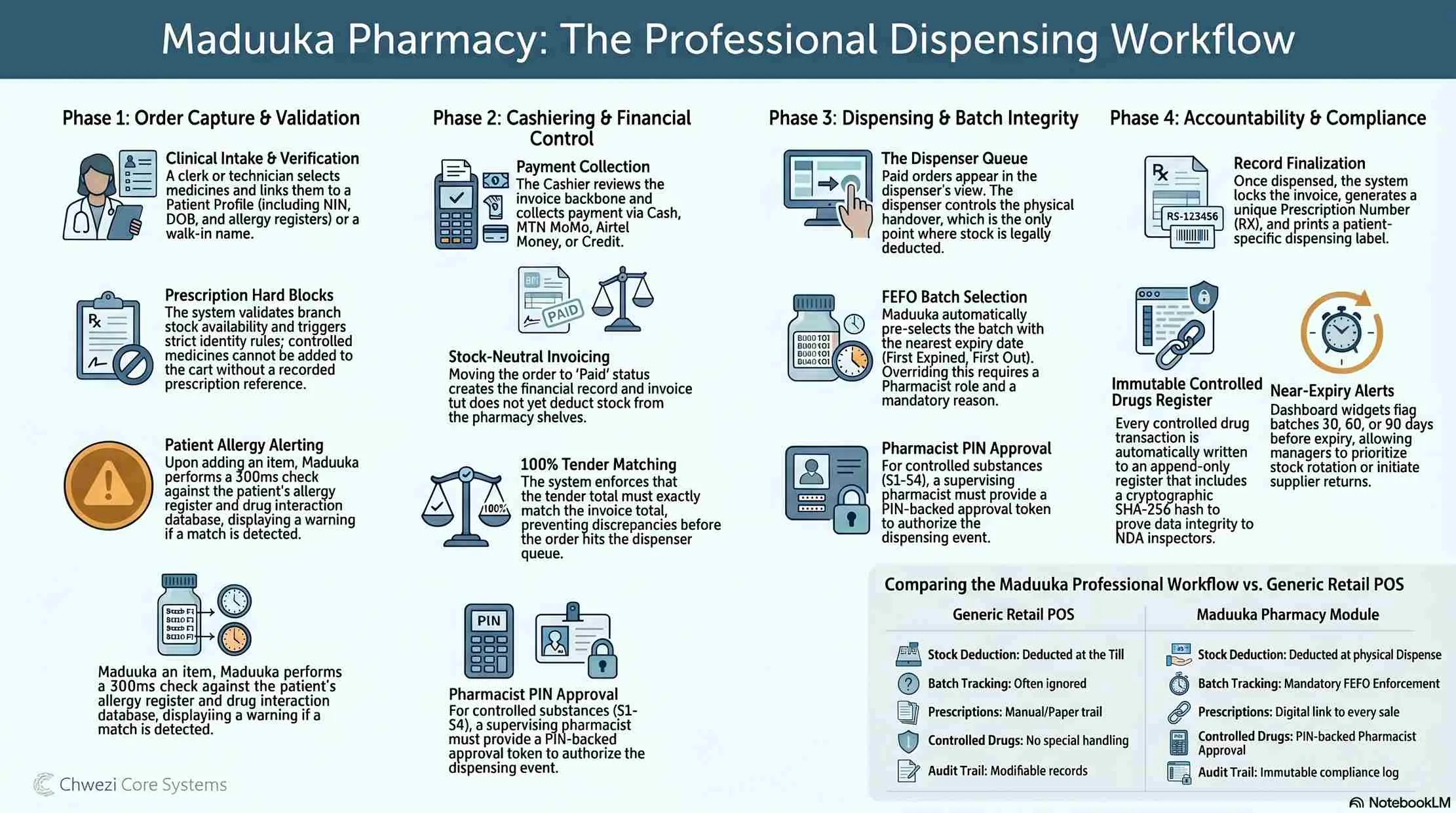
See the full dispensing workflow in one view
The pharmacy flow separates validation, cashiering, dispensing, batch control, exceptions, and reporting so stock, cash, medicine handover, and audit history stay aligned.
Why It Matters
A pharmacy sale should not be one blind till event.
In many generic POS systems, the cashier records the sale, stock drops immediately, and the audit story ends there. That is weak control for a pharmacy, especially when prescriptions, controlled medicines, partial dispensing, customer credit, or batch-level returns are involved.
Maduuka splits the work into permissioned steps so the business can see what was requested, what was paid for, what was physically dispensed, what remains pending, and what was refunded or returned later.

How the Pharmacy Workflow Works in Maduuka
Every important action is separated, timestamped, and traceable so stock, dispensing, and finance stay coherent.
1. Order Capture and Validation
- A clerk selects medicines, links them to a patient profile or a walk-in name, and can attach a prescription reference.
- Prescription orders enforce stronger rules: walk-ins cannot carry prescriptions, the patient must have a phone number, and controlled medicines cannot be sold without a prescription.
- Before the order is accepted, Maduuka validates branch context, confirms the branch has a warehouse, and blocks the sale if branch stock is insufficient.
2. Cashier Review and Payment
- The order is created with invoice items, but the pharmacy order stays in `ordered` state and no stock is deducted yet.
- Cashiers review patient, branch, prescription reference, item preview, and available customer credit before taking payment.
- Payment can be cash, mobile money, bank transfer, card, credit, or split tender, and Maduuka validates that the tender total exactly matches the invoice total.
3. Dispensing and Batch Control
- After payment, the order moves to `paid`, Maduuka stamps who took payment and when, and writes a `payment_taken` event to the audit trail.
- Paid orders enter the dispenser queue by payment time, where Maduuka calculates pending quantity, dispensed quantity, and FEFO batch suggestions from approved non-expired batches.
- Controlled medicines require a second-person approval with a pharmacist PIN-backed token tied to the exact dispense action.
4. Exceptions, Returns, and Reporting
- Stock is deducted only when the dispenser confirms. Invoice records and affected batches are locked, quantities move atomically, and failures roll back completely.
- Orders can end as `dispensed` or `partially_dispensed`, with pending balance left visible for any unserved quantity.
- Maduuka supports voids, refunds, flags back to cashier, partial close with refund, and full returns to the original source batch. Revenue reports count only dispensed or partially dispensed orders.

Accountability
The workflow is built to stop leakage, not just record sales.
Role separation: order entry, cashiering, dispensing, controlled-drug approval, refunds, and returns are permissioned separately.
No silent stock leakage: stock is reduced only at dispense, not at order creation or payment time.
Batch traceability: each dispensed line is tied to the exact source batch used to fulfil it.
Cash accountability: payments are mapped to payment methods, posted to the right ledger account, and credit sales create debt records.
Complete event trail: creation, payment, dispense, cancellation, flagging, refund, partial close, and return all land in the pharmacy audit log.
Supervisor control: controlled substances require a different approving user, not self-approval by the dispenser.
Cleaner reconciliation: pharmacy revenue reflects fulfilled medicine sales, not money collected before dispensing.
Branch accountability: queues and actions are branch-scoped so staff cannot casually process another branch's orders.
Module Gallery
Pharmacy module gallery

Pharmacist using a tablet to review medicine records and stock information

Pharmacy counter interaction showing medicine handover and guided customer service

Pharmacist explaining treatment and dosage guidance to a patient
Questions Pharmacies Ask Before Switching
The workflow is strict on purpose: it protects stock, cash, patient records, and compliance.
Ready to run a pharmacy on tighter operational controls?
Maduuka gives your clerks, cashiers, dispensers, supervising pharmacists, and finance team a cleaner workflow from order capture to batch-level return. Also explore the related restaurant module if your business operates both counters and kitchens. The same inventory engine powers batch, expiry, FEFO, stock count, and recall controls across the wider platform.